















































Container Tracking
track & trace your container easily
Your tracking history
Clear Tracking History
Are you sure to clear all of your tracking history?
How does it work?
Visiwise container tracking tool, collects data from multiple sources like shipping lines, AIS data, port and terminals, railways and then refine and standardize them to make a unified experience to track cargos and bring visibility.

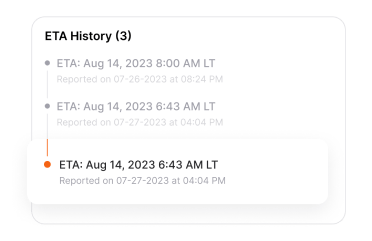
Arrival and Departure
Be always aware of scheduled timing and delays.
• Estimated arrival time (ETA) to port of discharge
• Departure time
• Arrival and departure time to transshipment ports
• History of ETA changing in time

Port and Terminal
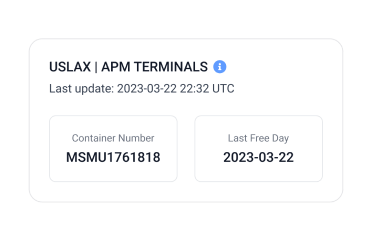
Coverage for USA and Canada ports and terminals.
• Last free day (to manage demurrage)
• Fees
• Freight Holds (Custom, VGM, Carriers)
• Available for pick-up

Location and Vessel Tracking
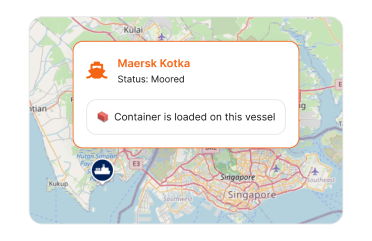
Real-time location of vessel which carries the container (latitude and longitude) on the world map.
• Vessel name and IMO & MMSI
• Latitude and longitude of the vessel
• Voyage number
• Arrival time of the vessel to destination ports

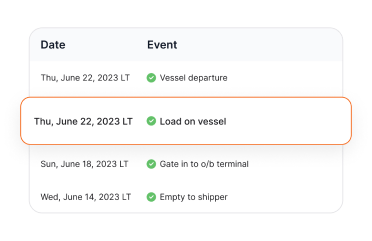
Movements (Milestones)
Current movement and history of movements which is standardized and is unified across all shipping lines.
Important movements you may need:
• Loaded on vessel at port of loading
• Gate out from port of discharge terminal
• Empty returned to container yard or terminal and etc
• And more events …

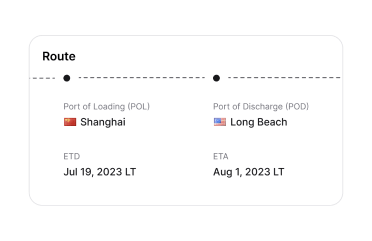
Route
Details of container journey legs. UNLocodes are available for ports and cities.
• Origin (Place of receipt) and Destination
• Port of loading and Port of discharge
• Transshipment ports

Rail Data
Enhanced in-land visibility with rail statuses. (Coming soon …)
• ETA at rail ramps
• Information of rail ramps

Benefits
What do you get by using our container tracking tool?

Cost Saving
Be one step ahead of unexpected costs. Control demurrage and detention expenses.

Time Saving
You don’t need to check multiple websites and sources to check the status of shipments.

Make better decisions
Be always informed about pick-up and deliveries and proactively manage exceptions.
Features

Notifications and Alerts
Get email on important events such as ETA delays, vessel arrival, gate-out time or alert on containers which are at risk of demurrage.
You can completely customize notifications based on your preferences.
Examples:
• Digest report email of at risk of demurrage containers every morning at 9 AM
• Email immediately after ETA update of a container

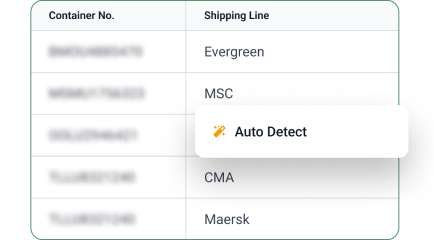
Carrier Auto-detection
Let Visiwise's AI system automatically detect the carrier of your containers. Use “AUTO“ instead of the shipping line name and see the magic.

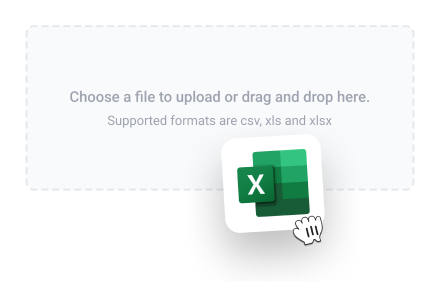
Import from Spreadsheet (Batch Excel Upload)
Track and trace a list of ocean shipments by container,
master bill of lading, or booking number at once by uploading
an Excel or CSV file.

API Integration
Automate your container tracking process using our GraphQL API. You can also integrate it with TMS or ERP softwares such as SAP, Microsoft Dynamics Nav.

Integrated with PO Number, Customers
Integrate shipments with PO numbers or customers and easily filter containers based on them.
Coverage
Covers more than 90% of containers all around the world. See the list of supported shipping lines.

Master Bill of Lading and Booking Number
You can track containers using container number or master bill of lading number or booking number. Some shipping lines have limits for tracking via different types of references.
FAQ
How can I track a container?
You can track a container with Visiwise by entering a container number, booking number, or bill of lading number in the tracking tool. Once submitted, Visiwise shows the latest shipment status, current position, route information, and transit events.
Can I track my shipment using a Bill of Lading number?
Yes. Visiwise supports shipment tracking with a Bill of Lading number. Enter the B/L number in the Bill of Lading tracking field to view the latest available shipment information.
Can I track a shipment without a container number?
Yes. If the container number is not available, you can use a booking number or bill of lading number instead, depending on the available tracking data.
What details do I need for container tracking?
You usually need at least one tracking reference: a container number, bill of lading number, or booking number. Visiwise uses these identifiers to find and display the related shipment details.
What is the format of a container number?
A container number follows the ISO 6346 format and usually includes four letters followed by seven numbers, such as ABCU1234567. The letters identify the owner and equipment category, while the numbers include the serial number and check digit.
What information does container tracking provide?
Visiwise container tracking provides shipment events, container status, vessel movements, route details, origin and destination information, and estimated arrival updates.
What extra tracking data does Visiwise add for container shipments?
Visiwise enriches shipment visibility by combining carrier tracking data with AIS vessel positions, port and terminal updates, ETA revisions, and inland transport data when available.
How accurate is Visiwise container tracking?
Visiwise provides highly reliable container tracking using multiple shipping data sources, AIS vessel signals, and real-time port information. Its container tracking success rate is over 96%.
How do I track multiple containers at once?
You can track multiple containers in Visiwise by entering or uploading a list of container numbers, booking numbers, or bill of lading numbers. This allows you to monitor all active shipments from one dashboard.
Visiwise Multiple Tracking:
How can freight forwarders track bulk shipments?
Freight forwarders can track bulk shipments in Visiwise by entering or uploading multiple container numbers, booking numbers, or bill of lading numbers at once.
Visiwise Multiple Tracking:
Best Ease of Use in Shipment Visibility

Thanks to authentic user reviews