

















































MSC Bill of Lading Tracking
Track your MSC bill of lading easily
Your tracking history
Clear Tracking History
Are you sure to clear all of your tracking history?

MSC Bill of Lading Tracking
The bill of lading is a document and evidence of delivery of the cargo to the shipping line. After delivery of the full loaded containers to MSC shipping line, the shipping company will issue the bill of lading based on a procedure. Having this bill of lading (BL) number, you can easily track your cargo via MSC bill of lading tracking on Visiwise.
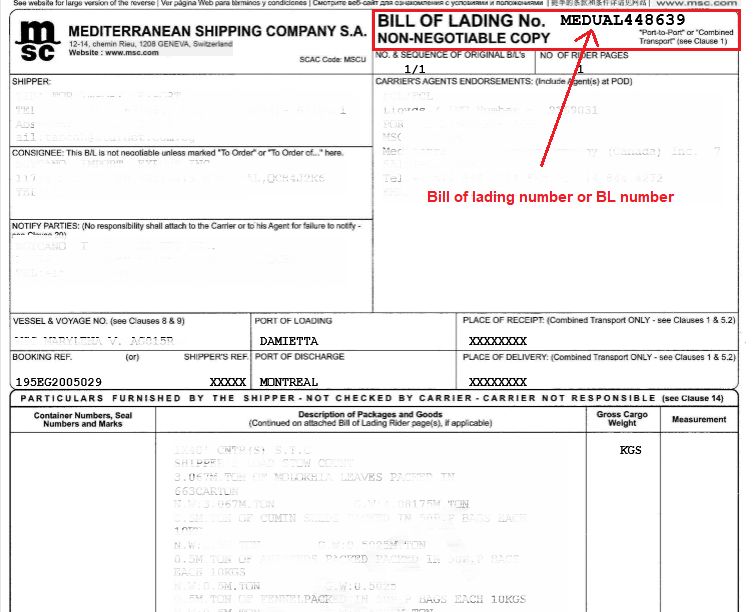
How to find the MSC bill of lading number?
Below image shows how you can easily find the MSC master bill of lading (MBL) number if you have the MSC MBL.
About Mediterranean Shipping Company
Mediterranean Shipping Company (MSC) is a privately owned global organization operating a network of over 480 offices in 155 countries, employing a team of over 70,000 dedicated individuals.
MSC an established fleet of 490 container vessels with an intake capacity of circa 3.1 million TEU. Its global sailing schedules cover 200 routes, calling at 500 ports, to deliver your cargo almost anywhere in the world. MSC operates ships with up to 19,244 TEU capacity, including one of the biggest container vessels, MSC Oscar. MSC Oscar, MSC Zoe and MSC Oliver, are its largest container ships. The company is independent and wholly owned by Aponte family.
| Founded | Naples, Italy, 1970 |
| Headquarters | Geneva, Switzerland |
| Number of employees | 28,000 (2014) |
| Website | www.msc.com |

FAQ
How can I track an MSC container?
You can track an MSC container on Visiwise by entering the container number, booking number, or bill of lading number into the tracking tool. Once you submit the details, Visiwise shows the latest shipment status, location, and transit updates.
Can I track my MSC shipment using a Bill of Lading number?
Yes, you can track any MSC shipment in Visiwise using its Bill of Lading number. Simply enter the B/L number in the "Bill of Lading" section to view real-time updates.
Can I track an MSC shipment without a container number?
Yes, on Visiwise you can track an MSC shipment without a container number by using a booking number or bill of lading number. Depending on the information provided by the carrier, Visiwise can help you find shipment status updates using these alternative tracking details.
What details do I need for MSC tracking?
To track an MSC shipment, you need a container number, bill of lading number, or booking reference. In Visiwise, you can track an MSC shipment using any of these references.
What is the format of an MSC container number?
An MSC container number follows the ISO 6346 standard and is usually written as four letters followed by seven digits, such as MSCU1234567. The first four characters identify the container owner and equipment category, while the last seven digits include the unique serial number and check digit.
What information does MSC tracking provide?
By tracking a container on the MSC website, you can view container milestones and the shipment route, including origin and destination.
What extra tracking data does Visiwise add for MSC shipments?
Visiwise provides all the information available on the MSC website, plus additional insights. It cross-checks container status with AIS vessel location data and terminal status updates at the destination port. If the shipment includes an inland leg such as rail transport, Visiwise continues tracking the container during that stage, a capability not available on the MSC website. Visiwise also provides real-time vessel movements, ETA updates, and complete end-to-end visibility.
What is the difference between MSC tracking and Visiwise tracking?
MSC's own tracking tool shows carrier-reported container milestones and the shipment route. Visiwise goes further by cross-referencing that data with AIS vessel signals, terminal updates at the destination port, and inland transport tracking, providing a more complete picture that includes ETA updates, vessel coordinates, and end-to-end visibility beyond what the MSC website offers.
How can I track my MSC vessel?
You can track MSC vessel positions in real time using Visiwise's vessel tracking feature. For each vessel, Visiwise provides the vessel name, IMO number, current coordinates, and up-to-date ETA for the destination port.
How do I track my MSC order?
Enter your Bill of Lading or booking number in Visiwise to view order-level shipment details and milestones. Visiwise displays the vessel name, IMO number, current vessel coordinates, and the latest ETA so you can monitor your order's progress end to end.